FEMA
Taking FEMA courses
Various SQTR tasks require the completion of a free FEMA ICS/NIMS course. You can view a list of FEMA course at this link.
- If you don't already have one, you will need to register for a FEMA SID
- Select the course you require and complete the materials and take the test
- Download the course completion certificate (PDF)
Uploading your certificate to eServices
- Sign in to eServices
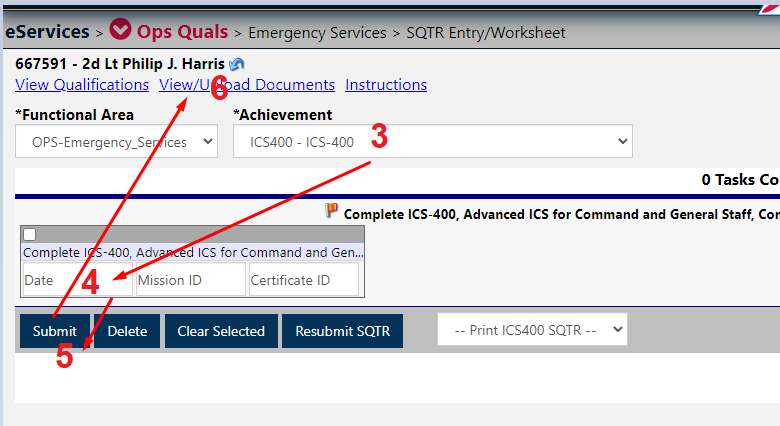
- Go to Operations Qualifications, then SQTR Entry Worksheet (click here if you don't know how)
- In 'Achievement' select the FEMA course you just completed
- Enter the date of completion - you can leave Mission ID and Certificate ID blank
- Press submit
- Click View/Upload documents
- Select the correct FEMA course
- Choose the file where you saved your course completion certificate
- Click Upload ES Files
Once uploaded a member of your command team, or operations staff will validate your task completion.